Debug
文章目录
工具
- dap protocol in vscode, emacs
icecream
- GitHub - gruns/icecream: 🍦 Never use print() to debug again.
- 一个 debug 版的 print 快捷美化替代工具
- eg:
ic(my_fun('input_argument'))
- Debugging configurations for Python apps in Visual Studio Code
参数:
name
- 解释: 创建的 configuration 的名称
- 类型: str
type
- 对于 python 项目,设置成
python
- 对于 python 项目,设置成
request
- 解释: debug 的方式(mode)
- 类型: str
可选值
- "attach": debug 一个已经启动的程序(进程)
- "launch": debug 一个待启动的程序
program
- 解释: .py 文件的路径
可选值:
${file}: debug 过程中当前文件- .py 文件的详细路径
相对 project-root 路径
- eg:
"${workspaceFolder}/pokemongo_bot/event_handlers/__init__.py"
- eg:
python
- 解释:python interpreter 路径
可选值:
- 不设置, 由环境自行确定
- python.exe 和 python 命令的路径
module
- 执行的 python 模块名称,类似 python -m my_run_module_to_run
- 类型: str
- eg: "my_moduleA.moduleB"
pythonArgs
- 传给 python interpreter 的参数
- 类型: list[str]
args
- 解释传给 待 debug 的 python 程序的命令行参数
- 类型: list[str]
cwd
- current word directory, 工作目录
- 类型: str
可选:
- 路径
"${workspaceFolder}": project-root
vscode 中 debug
要点:配置 .vscode/launch.json 文件
添加 launch.json 方法:
- 手动添加
- 使用菜单栏添加,
菜单栏 -> Run -> Add Configuration
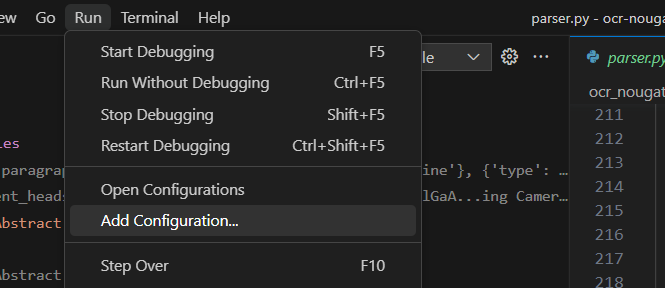
添加单个配置
打开 launch.json 文件后,在编辑页面右下角找到 Add Configuration 按钮,点击它
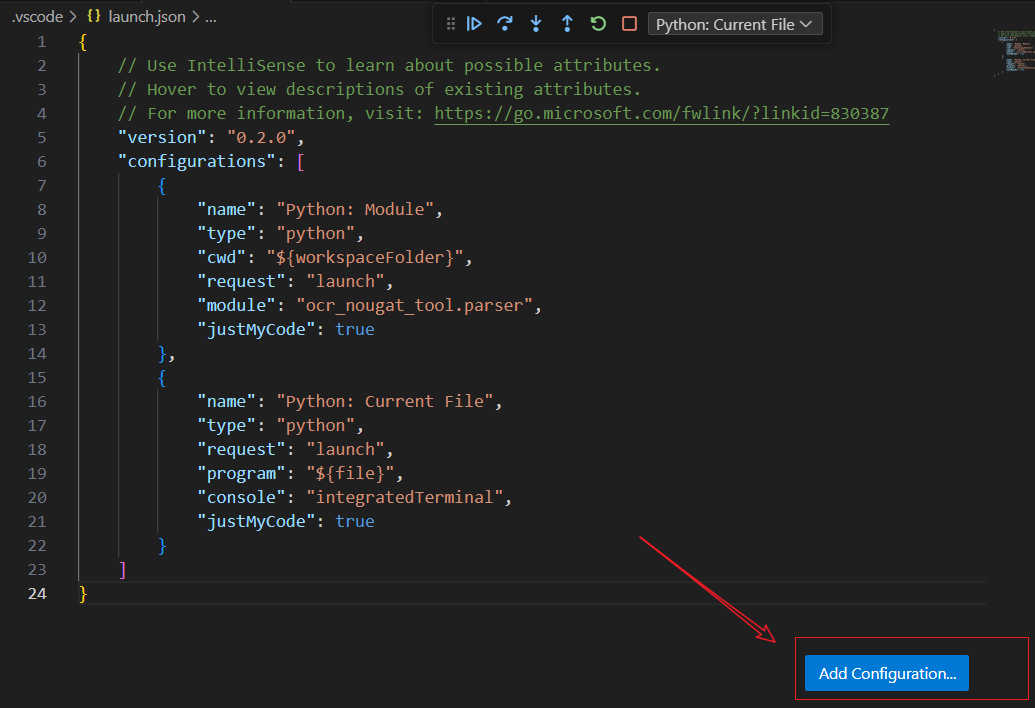
debug .py 文件
| |
debug 一个 module
| |
使用 emacs dap-mode 配置
单个文件
| |
验证可用的 template:
project-root .py 文件下
Python: This ModulePython :: Run file (buffer)
给定 buffer
我自己的动态 template
| |
文章作者
上次更新 2024-07-16 (7f33ae8)